Overview
The schema in the Q&B system is used to setup and configure the quote application form and handle the whole quoting process.
Schema in a nutshell is a meta definition of insurance quote application form. Schema defines risk questions to be captured, external integration points for data pre-load/export, document generation services and sales process workflow steps.
A new schema should be created whenever a new product has to be set up in the platform.
Using the schema structure logic, you can define following elements of quote configuration:
- Quote form - quote input fields (quote application questions), visual elements, actions, buttons
- Dynamic rules - quote fields internal and dynamic logic (e.g. show field depending on value)
- External connections - external data pull/push calls to enrich quoting process (e.g. get quote rate from the external engine)
{info.fa-info-circle} Schemas can only be created and modified by Insly product owners and super-users.
Schemas List
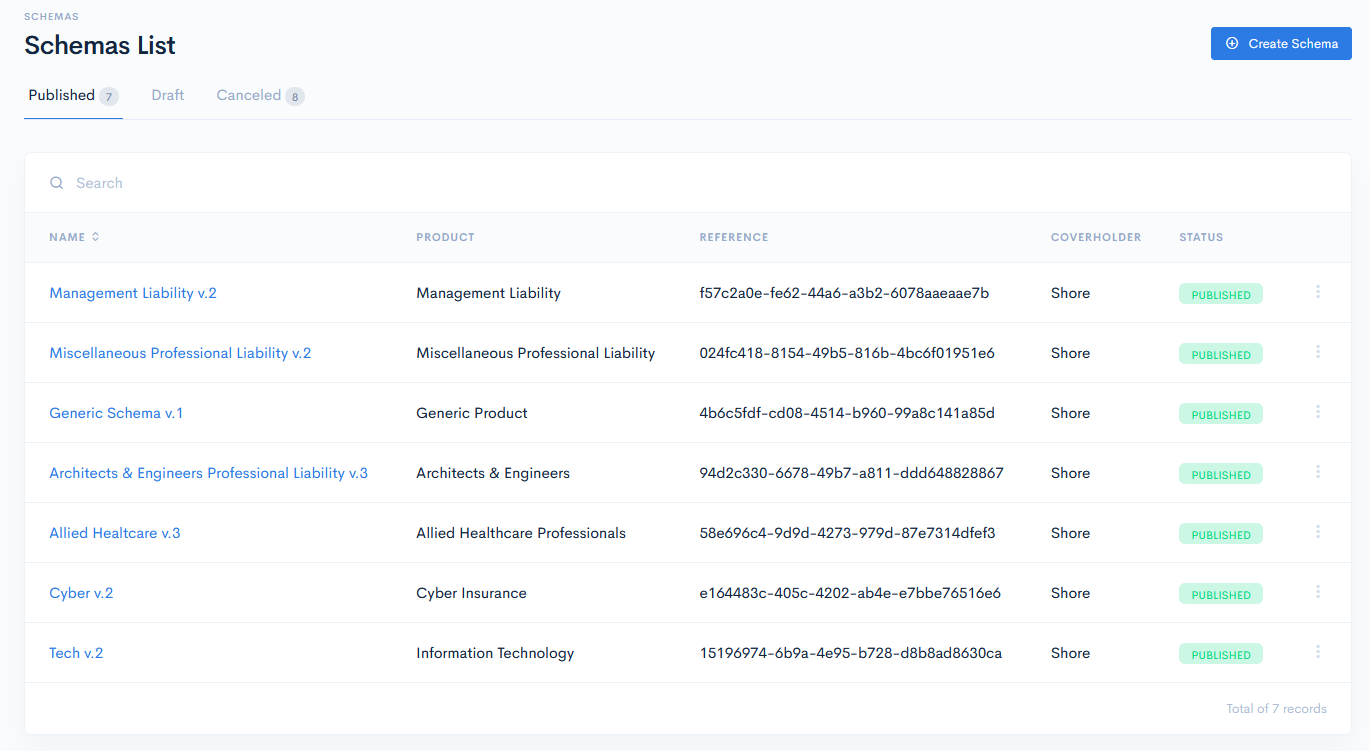
To access schemas, click Underwriting on the left sidebar and from the drop down menu select Schemas.
In the new window you will see the list of statements, which can have the following statuses:
- Published - assigned for every published schema version.
- Draft - assigned for every newly created schema version (also can be understood as setup in-progress).
- Canceled - the schema version is not active/available, but published quotes, or quotes in draft will transition to this status if a new version is created.
You can filter schemas by these types by clicking on the corresponding tab above the list. The adjacent number shows how many schemas have this status.
The statements list has the following columns:
| Name | Name of the schema. Note: You can sort the list by name in asceding or descending order, if you click on Name. |
| Product | The product, which your schema is dedicated to. |
| Reference | The unique reference record, which is created automatically by the system. |
| Coverholder | Owner of the schema. |
| Status | Status of the schema. Possible options, which are hardcoded:
|
{info.fa-info-circle} You can filter out the list by name and coverholder in the search bar.