Home / JSON Structure / API Integrations
- API Integrations
API Integrations
API (application programming interface) is the part of a software application that handles communications with other separate applications. API integrations themselves describe this connection and this is done in the index.json file.
On the back-end, API sit in the middle of the application and the server. The user asks the application to perform a task and the application uses the API to meet the demand. The API, in turn, must send a call to the server to make a formal request. In the Q&B system these tasks can be to create an invoice, calculate some premiums, generate a document PDF from a quote, etc.
In this chapter we are going analyse the mostly used external and internal API integration cases: generate a simple PDF document to a template, a PDF document with endorsements, create an invoice, duplicate quote, create code for client, send notification, copy binders document and create transaction.
External - Simple PDF Document
{info.fa-info-circle} In this example other parts of the schema are removed for more clarity.
In the Q&B system PDF documents are generated through the integrated Carbone generator, which is accessed by the defined API. To define this API, you have to open your schema, click on the index.json and start creating an object in the apiIntegrations keyword.
Lets look at the following example:
{
  "label": "Private Aircraft",
  "uiType": "quote",
  "version": "1.0",
  "apiIntegrations": {
      "followPolicy": {
        "label": "Generate Follow Policy",
        "type": "carbone",
        "outputFormat": "pdf",
        "templateTag": "followPolicy",
        "requestFields": {
            "quote.binderNumber": "binderNumber",
            "quote.policyNumber": "followPolicyNumber",
            "quote.policyForm": "otherMga",
            "quote.currency": "currency",
            "application.nameofInsured": "insured",
            "application.insuredStreet": "application.insuredStreet",
            "application.insuredCity": "application.insuredCity",
            "application.insuredProvince": "application.insuredProvince",
            "application.insuredPostcode": "application.insuredPostcode",
            "quote.effectiveDate": "quote.effectiveDate",
            "quote.expiryDate": "quote.expiryDate",
            "premium.hullCoverage": "hullCoverage",
            "premium.liabilityCoverage": "liabilityCoverage",
            "premium.endorsementPremium": "endorsementPremium",
            "premium.subTotal": "subTotal",
            "premium.policyFee": "policyFee",
            "premium.grossPremium": "grossPremium",
            "premium.brokerComm": "brokerComm"
        },
        "policyFields": {
            "number": "policy.number"
        },
        "transformations": [
            {
            "entryKey": "quote.brokerEntity",
            "options": "agents",
            "optionValue": "name",
            "requestField": "brokerEntity"
            },
            {
            "entryKey": "quote.brokerEntity",
            "options": "agents",
            "optionValue": "address_street",
            "requestField": "brokerStreet"
            },
            {
            "entryKey": "quote.brokerEntity",
            "options": "agents",
            "optionValue": "address_town",
            "requestField": "brokerTown"
            },
            {
            "entryKey": "quote.brokerEntity",
            "options": "agents",
            "optionValue": "address_post_code",
            "requestField": "brokerPostcode"
            },
        ],
      }
    }
  }
}
Here we have an API integration, which is used to generate a policy document. The whole structure is defined in the followPolicy object (you can name it your whatever you want). It consists of the following keywords:
label- type whatever you liketype- for document generation directly from a quote it is alwayscarboneoutputFormat-pdfordocxtemplateTag- enter the tag, that is assigned to the used document template. The document template should be already done and uploaded to the system.
  "apiIntegrations": {
  "followPolicy": {
    "label": "Generate Follow Policy",
    "type": "carbone",
    "outputFormat": "pdf",
    "templateTag": "followPolicy",
}
  }
}
RequestFields
The next object is requestFields, where you map all the required quote fields to the document template.
  "requestFields": {
    "quote.binderNumber": "binderNumber",
    "quote.policyNumber": "followPolicyNumber",
    "quote.policyForm": "otherMga",
    "quote.currency": "currency",
    "application.nameofInsured": "insured",
    "application.insuredStreet": "application.insuredStreet",
    "application.insuredCity": "application.insuredCity",
    "application.insuredProvince": "application.insuredProvince",
    "application.insuredPostcode": "application.insuredPostcode",
    "quote.effectiveDate": "quote.effectiveDate",
    "quote.expiryDate": "quote.expiryDate",
    "premium.hullCoverage": "hullCoverage",
    "premium.liabilityCoverage": "liabilityCoverage",
    "premium.endorsementPremium": "endorsementPremium",
    "premium.subTotal": "subTotal",
    "premium.policyFee": "policyFee",
    "premium.grossPremium": "grossPremium",
    "premium.brokerComm": "brokerComm"
  }
The key is a path to the quote field, and a value is a marker name in the document template. For example, these two rows are taken from different JSON files: quote.json, application.json and refer to the elements policyNumber and nameOfInsured. The values themselves will be mapped to the document template markers followPolicyNumber and insured.
  {
  "quote.policyNumber": "followPolicyNumber",
  "application.nameofInsured": "insured",
  }
For easier understanding, we will create a quote from this schema and see what info will be mapped.
Here Policy Number and Name of Insured will be taken from the quote:
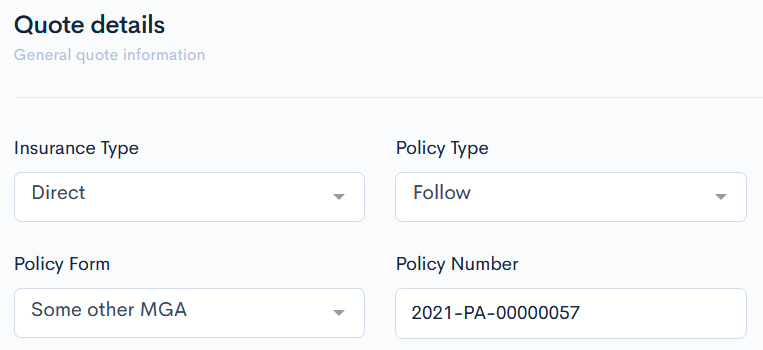

This entered info will be mapped into the following document template markers, which is covered in curly brackets:
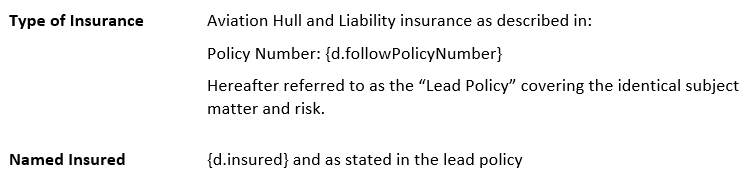
This way all fields mentioned in the JSON file can be mapped to the document template.
{info.fa-info-circle} The title of a quote field does not always match with its element name. This can be looked up in the relevant JSON file.
Transformations
Sometimes you need to map several values from a dataset, related to a one particular value from the selection list in a quote. This is where the transformations key comes to help. This keyword takes a value from the defined dataset and maps it to the document template marker.
For example, you have selected a broker from the Brokerage field and you need to map its name and full address. This info has to be already entered into the datasets and will be taken from there.

In the following code snippet we can see, that the entryKey keyword defines the path to the quote selectable field. The options key refers to the agents dataset, where from the columns name, address_street, address_town and address_post_code the required info, related to Brokerage will be mapped to the document template fields, which are defined by the requestField keyword.
{
  "transformations": [
    {
    "entryKey": "quote.brokerEntity",
    "options": "agents",
    "optionValue": "name",
    "requestField": "brokerEntity"
    },
    {
    "entryKey": "quote.brokerEntity",
    "options": "agents",
    "optionValue": "address_street",
    "requestField": "brokerStreet"
    },
    {
    "entryKey": "quote.brokerEntity",
    "options": "agents",
    "optionValue": "address_town",
    "requestField": "brokerTown"
    },
    {
    "entryKey": "quote.brokerEntity",
    "options": "agents",
    "optionValue": "address_post_code",
    "requestField": "brokerPostcode"
    },
  ],
Everything will be mapped to these document template markers:

External - PDF Document with Objects and Endorsements
{info.fa-info-circle} In this example other parts of the schema are removed for more clarity.
The basics of this document generation are the same as in the previous chapter, so we will look exactly at the code snippet of elements for objects and endorsements mapping.
{
  "objects": {
    "objects.{0}.group.name": "object.{0}.group",
    "objects.{0}.category.name": "object.{0}.category",
    "objects.{0}.number": "object.{0}.number",
    "objects.{0}.description": "object.{0}.description",
    "objects.{0}.cover_begin": "object.{0}.cover_begin",
    "objects.{0}.cover_end": "object.{0}.cover_end",
    "objects.{0}.premium": "object.{0}.premium",
    "objects.{0}.value": "object.{0}.value"
  },
  "endorsements": {
    "fleetendorsements": {
      "endorsements.{0}.name": "endorsements.{0}.name",
      "endorsements.{0}.description": "endorsements.{0}.description"
    },
    "subjectivities": {
      "subjectivities.{0}.tag": "subjectivities.{0}.tag",
      "subjectivities.{0}.name": "subjectivities.{0}.name",
      "subjectivities.{0}.description": "subjectivities.{0}.description"
    }
  },
Objects
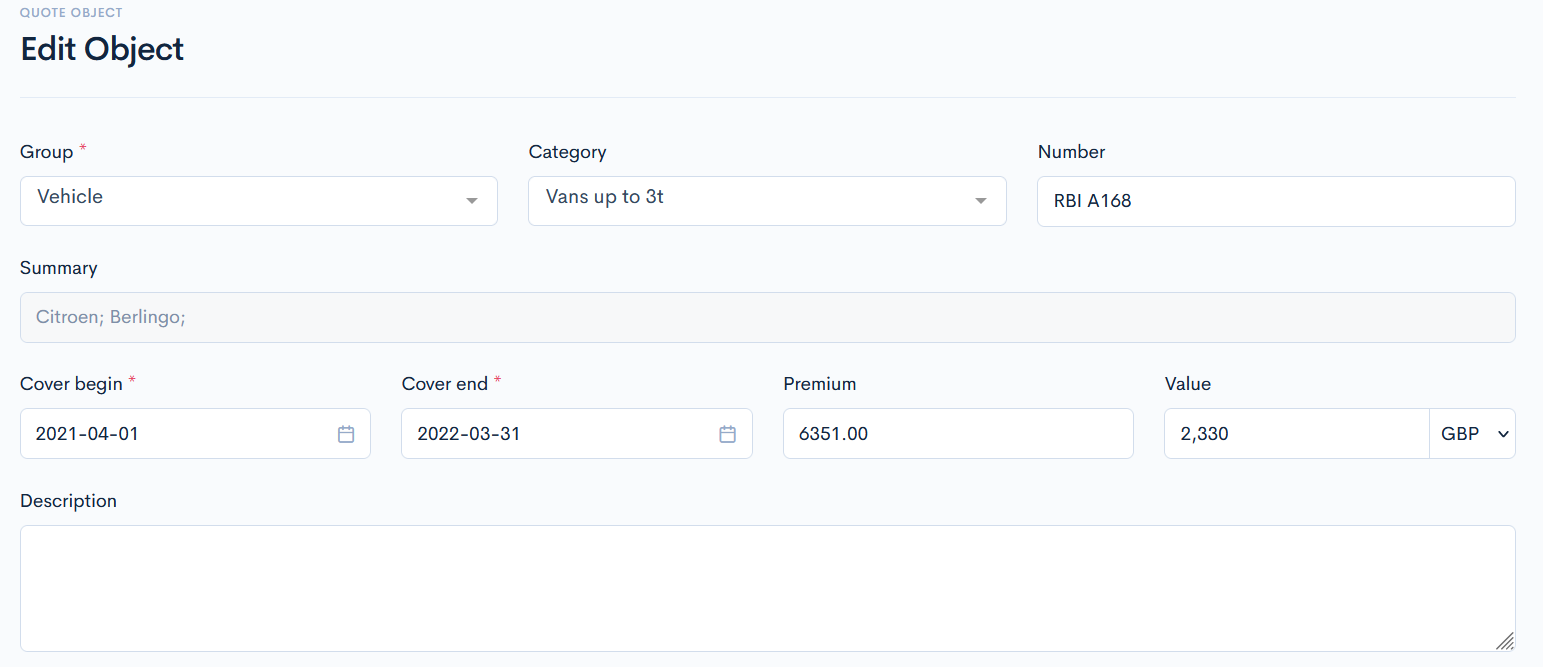
In the objects element, objects assigned to a quote will be mapped to the document template markers. The key is a path to the objects dataset and the particular column, value is a marker name in the document template. The {0} sign means, that absolutely all objects from the dataset will be mapped.
All these values can be seen in the Edit Object page. The main Objects page also contains them, but not all.
Endorsements
In the endorsements object, endorsements assigned to a quote will be mapped to the document template markers. The key is a path to the Endorsements library and the particular details, value is a marker name in the document template. The {0} sign means, that absolutely all endorsements from the library will be mapped.
There can be several endorsement libraries, so firstly you must define which one should be used. You can also define some endorsements, that will be mapped by default.
{
  "endorsements": {
    "label": "Endorsements",
    "uiType": "endorsements",
    "uiProperties": {
      "library": "MPLE",
      "defaultEndorsements": [
        "MPLE.40",
        "MPLE.41",
        "MPLE.42",
        "MPLE.43",
        "MPLE.44",
        "MPLE.45"
      ]
    }
  },
  "subjectivities": {
    "label": "Subjectivities",
    "uiType": "endorsements",
    "uiProperties": {
      "library": "MPLS"
    }
  },
For example, endorsements.{0}.name will take the endorsements names from the MPLE library and subjectivities.{0}.tag will take the endorsements tags from the MPLS library. The same is with description.


The information will be mapped accordingly here:


Internal - Invoice
{info.fa-info-circle} In this example other parts of the schema are removed for more clarity.
The invoices can be created manually or by calling the API integration directly from the quote. In this chapter we will discuss the latter.
In the Q&B system invoices are generated through the internal generator, which is accessed by the defined API. To define this API, you have to open your schema, click on the index.json and start creating an object in the apiIntegrations keyword.
Lets look at the following example:
{
  "label": "Miscellaneous Professional Liability",
  "uiType": "quote",
  "version": "1.0",
  "apiIntegrations": {
    "invoice": {
      "label": "Invoice",
      "endpoint": "internal.quotes.transactions.create",
      "type": "internal",
      "templateTag": "pmuInvoiceFr",
      "requestFields": {
        "quoteField.id": "quote_id",
        "submission.inceptionDate": "transaction_date",
        "premium.totalPremium": "childs.0.amount",
        "submission.shoreCommission": "childs.1.rate",
        "submission.brokerCommission": "childs.2.rate",
        "premium.policyFee": "childs.3.amount"
      },
      "staticFields": {
        "mode": "receivable",
        "create_invoice": true,
        "currency_code": "cad",
        "childs.0.category_tag": "premium",
        "childs.0.product_tag": "MPLchild",
        "childs.1.category_tag": "mga_commission",
        "childs.1.product_tag": "MPLchild",
        "childs.2.category_tag": "agent_commission",
        "childs.2.product_tag": "MPLchild",
        "childs.3.category_tag": "fee",
        "childs.3.product_tag": "MPLchild"
      },
      "responseFields": [],
    }
  }
Here we have an API integration, which is used to generate an invoice. The whole structure is defined in the invoice object (you can name it your whatever you want). It consists of the following keywords:
label- type whatever you likeendpoint- a connection point to the other system. For invoices it is alwaysinternal.quotes.transactions.createtype- for invoice generation it is alwaysinternaltemplateTag- generates PDF by the provided template tag
{
  "apiIntegrations": {
    "invoice": {
      "label": "Invoice",
      "endpoint": "internal.quotes.transactions.create",
      "type": "internal",
    }
}
RequestFields
The next object is requestFields, where you map all the required quote fields to the invoice document template.
{
  "requestFields": {
    "quoteField.id": "quote_id",
    "submission.inceptionDate": "transaction_date",
    "premium.totalPremium": "childs.0.amount",
    "submission.shoreCommission": "childs.1.rate",
    "submission.brokerCommission": "childs.2.rate",
    "premium.policyFee": "childs.3.amount"
  },
}
The key is a path to the quote field, and a value is a marker name in the document template. For example, these two rows are taken from different JSON files: submission.json, premium.json and refer to the elements shoreCommission and totalPremium. The values themselves will be mapped to the document template markers childs.1.rate and childs.0.amount. Childs should be understood as subtransactions: e.g., childs.0.amount will map the amount to the first subtransaction, childs.1.rate - the rate to the second subtransaction.
{
  "premium.totalPremium": "childs.0.amount",
  "submission.shoreCommission": "childs.1.rate",
}
{info.fa-info-circle} Subtransactions quantity is unlimited.
Not all values are taken directly from a quote. The following lines should be written for the system to understand from which quote and date transaction should be created:
{
  "quoteField.id": "quote_id",
  "submission.inceptionDate": "transaction_date",
}
To see more of the requestable fields, you can open some other invoice structure, where all possible fields are defined. To do this, in the sidebar click Finances and then Invoices. Select an invoice and hover over the three dots on the top-right of the main page. Click JSON Structure.
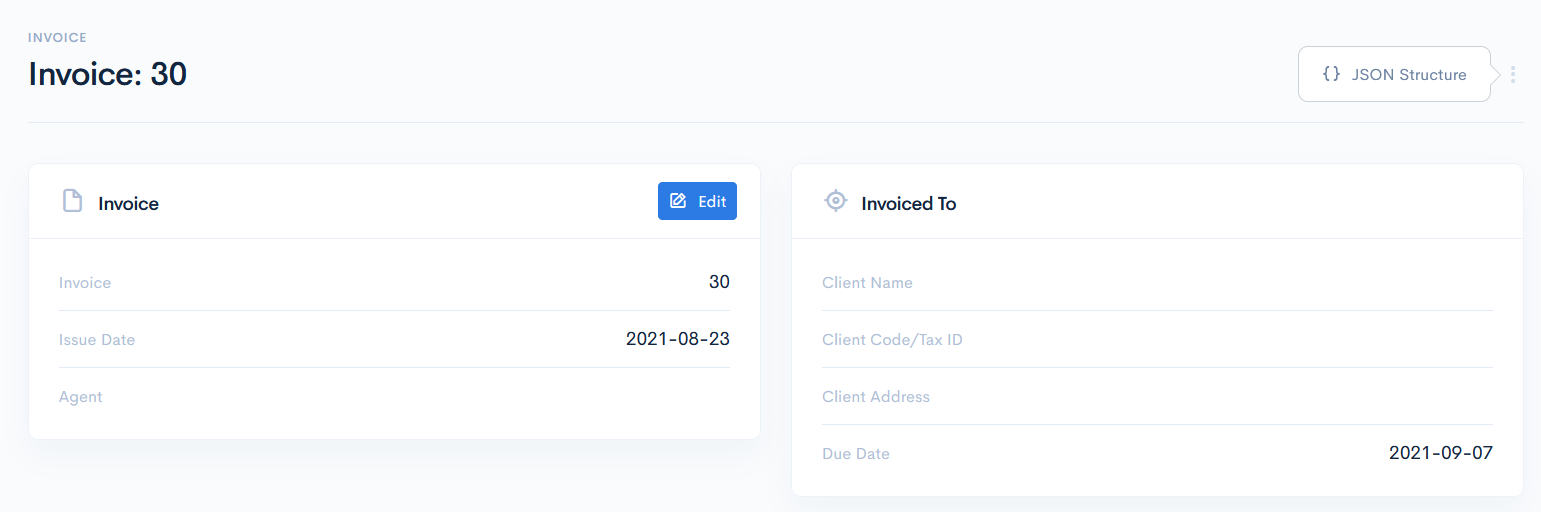
A new window with the invoice structure will open. The information here is useful when you create an invoice document directly from the transaction. You need to find the transaction types names in the totals object, that are mapped into the document. In the schema itself you do not need to do something additionally; the system will take the types and map them to the template automatically.
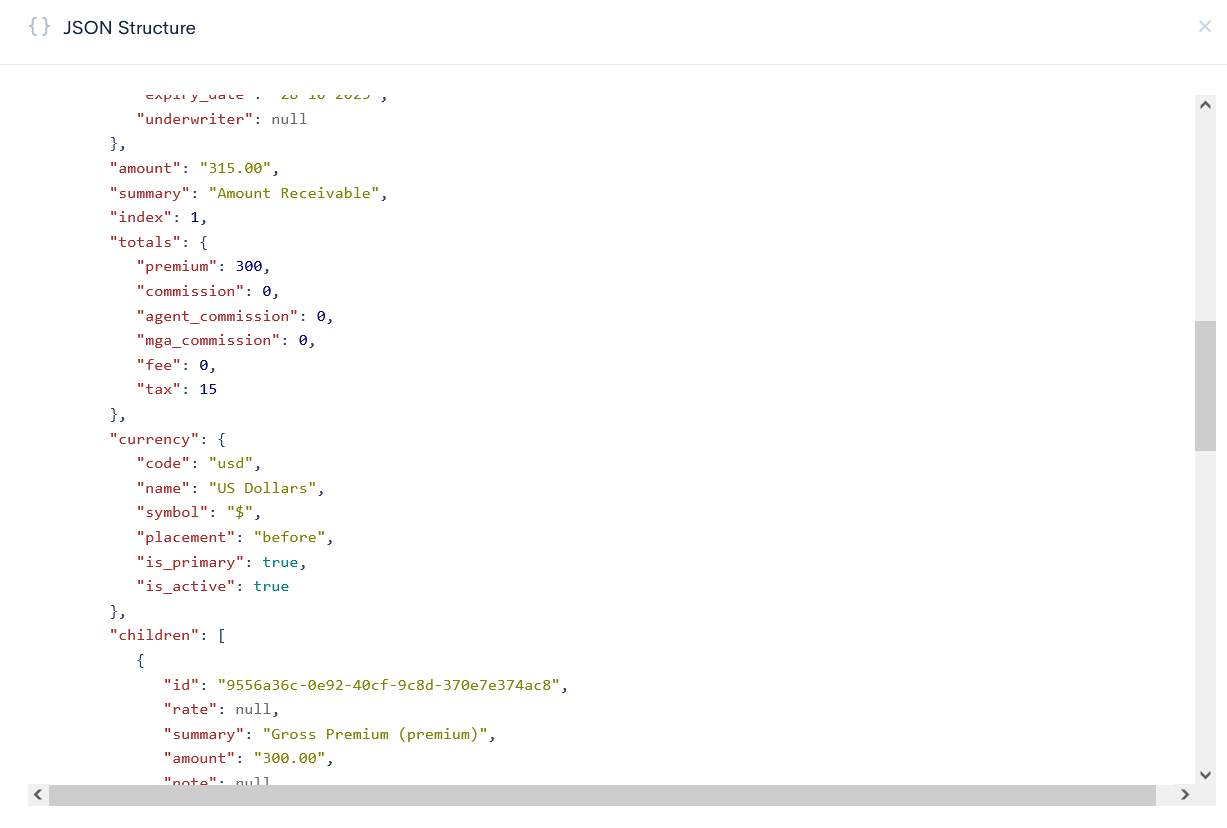
Example of the transaction mapping into the invoice:
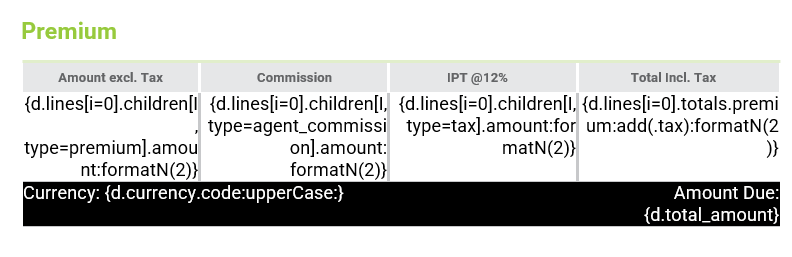
StaticFields
These fields are not taken from quote, they are taken from transactions and the values are used in creation of subtransactions. The staticFields object consists of the following elements:
mode- defines what transaction will be taken. For the invoice creation it is alwaysreceivablecreate_invoice- if the value istrue, then not only the transaction, but also the invoice document will be createdcurrency_code- defines the currency of the invoicechilds.0.category_tag- takes the transaction tag from the transaction categories list and applies it to the subtransaction creation defined inrequestFields.childs.0.product_tag- takes the child product tag from the product list and applies the product to the subtransaction creation defined in therequestFields
{
  "staticFields": {
    "mode": "receivable",
    "create_invoice": true,
    "currency_code": "cad",
    "childs.0.category_tag": "premium",
    "childs.0.product_tag": "MPLchild",
    "childs.1.category_tag": "mga_commission",
    "childs.1.product_tag": "MPLchild",
    "childs.2.category_tag": "agent_commission",
    "childs.2.product_tag": "MPLchild",
    "childs.3.category_tag": "fee",
    "childs.3.product_tag": "MPLchild"
  },
}
In this case, the tags premium and MPLchild will be applied to the first subtransaction (e.g. for the calculation of childs.0.amount), mga_commission and MPLchild to the second subtransaction (e.g. for the calculation of childs.1.rate), etc.
Internal - Invoice with Multiple Currency
{info.fa-info-circle} In this example other parts of the schema are removed for more clarity.
The generation logic of the invoice with multiple currencies is very similar to the generation of the simple invoice. The difference between those two is that for each currency different invoices will be generated.
Lets look at the following example:
{
"label": "Private Aircraft",
"uiType": "quote",
"version": "1.0",
"apiIntegrations": {
"invoice": {
  "label": "Invoice",
  "endpoint": "internal.quotes.transactions.create-multiple",
  "type": "internal",
  "method": "post",
  "requestFields": {
    "quoteField.id": "quote_id",
    "premiumtable.{0}.hullPremium.premiums": "transactions.{0}.0.amount",
    "premiumtable.{0}.policyFee.policyFee": "transactions.{0}.3.amount",
    "premium.brokerComm": "transactions.{premiumtable}.1.rate",
    "premium.avroComm": "transactions.{premiumtable}.2.rate"
  },
  "staticFields": {
    "mode": "receivable",
    "transaction_date": "2021-01-01",
    "create_invoice": true,
    "transactions.{premiumtable}.0.category_tag": "premium",
    "transactions.{premiumtable}.1.category_tag": "agent_commission",
    "transactions.{premiumtable}.2.category_tag": "mga_commission",
    "transactions.{premiumtable}.3.category_tag": "mga_fee"
  },
  "responseFields": [],
  "properties": {
    "reference": "invoice"
  }

}
Here we have an API integration, which is used to generate an invoice. The whole structure is defined in the invoice object (you can name it your whatever you want). It consists of the following keywords:
label- type whatever you like.endpoint- a connection point to the other system. For multi-currency invoices it is alwaysinternal.quotes.transactions.create-multiple.type- for invoice generation it is alwaysinternal.method- for invoice generation it is alwayspost.
RequestFields
In the requestFields object you must define all the field values, which have different currencies, by typing in the {0} symbol. This means, that all the transactions will be taken. The key is a path to the quote field, and a value is a marker name in the document template.
For example, these two rows are taken from different JSON files: premiumtable.json, premium.json and refer to the elements hullPremium.premiums and brokerComm. The values themselves will be mapped to the document template markers transactions.{0}.0.amount and transactions.{premiumtable}.1.rate.
{
"premiumtable.{0}.hullPremium.premiums": "transactions.{0}.0.amount",
"premium.brokerComm": "transactions.{premiumtable}.1.rate",
}
This API integration works only with the uiType moneyTable, therefore the key, which points to the premiumtable.json file, must be made of this uiType:
{
  "type": "object",
  "uiType": "moneyTable",
  "uiProperties": {
    "columns": {
      "premiums": {
        "label": "Premiums",
        "method": "sum",
        "rows": {
          "hullPremium": {
            "key": "aircraftdetails.{0}.aircraftHull.hullPremium",
            "label": "Hull",
            "readonly": false
          },
        }
      }
      "policyFee": {
        "label": "Policy Fee",
        "method": "sum",
        "rows": {
          "policyFee": {
            "key": "premium.policyFee",
            "label": "Policy Fee",
            "readonly": false
          }
        }
      }
    }
  }
}
Not all values are taken directly from a quote. The following lines should be written for the system to understand from which quote and date transaction should be created:
{
  "quoteField.id": "quote_id",
}
To see more of the requestable fields, you can open some other invoice structure, where all possible fields are defined. To do this, in the sidebar click Finances and then Invoices. Select an invoice and hover over the three dots on the top-right of the main page. Click JSON Structure.
A new window with the invoice structure will open. You can study it and maybe you will find some more fields to map into your quote.
StaticFields
These fields are not taken from quote, they are taken from transactions and the values are used in creation of subtransactions. The staticFields object consists of the following elements:
mode- defines what transaction will be taken. For the invoice creation it is alwaysreceivabletransaction_date- which date the transaction was createdcreate_invoice- if the value istrue, then not only the transaction, but also the invoice document will be createdtransactions.{premiumtable}.0.category_tag- takes the transaction tag from the transaction categories list and applies it to the subtransaction creation defined inrequestFields. The word in curly brackets must be replaced with the json file, that has multiple currencies.
{
"staticFields": {
    "mode": "receivable",
    "transaction_date": "2021-01-01",
    "create_invoice": true,
    "transactions.{premiumtable}.0.category_tag": "premium",
    "transactions.{premiumtable}.1.category_tag": "agent_commission",
    "transactions.{premiumtable}.2.category_tag": "mga_commission",
    "transactions.{premiumtable}.3.category_tag": "mga_fee"
  },
}
In this case, the tags premium and agent_commission will be applied to the first subtransaction (e.g. for the calculation of transactions.{0}.0.amount), mga_commission and MPLchild to the second subtransaction (e.g. for the calculation of transactions.{premiumtable}.1.rate), etc.
Internal - Duplicate Quote
{info.fa-info-circle} In this example other parts of the schema are removed for more clarity.
Sometimes you just need to duplicate the entered specific quote data into another quote, which belongs to another schema. For this you can use the duplicate API integration. Here you must define the fields to be requested, schema reference number, where the data will be mapped and the quote status, to which the first quote will transition after duplicating. After duplicating, a new quote with the mapped data will be created.
In the Q&B system quote duplicating is generated through the internal generator, which is accessed by the defined API. To define this API, you have to open your schema, click on the index.json and start creating an object in the apiIntegrations keyword.
Lets look at the following example:
{
  "label": "Express PWC JetSki",
  "uiType": "quote",
  "version": "1.0",
  "apiIntegrations": {
    "duplicateAPI": {
      "label": "Duplicate",
      "endpoint": "internal.quotes.duplicate",
      "type": "internal",
      "method": "post",
      "requestFields": {
        "quoteField.id": "quote_id",
        "quotedetails.estimateType": "fieldMap.quote.estimateType",
        "estimate.details.clientDoB": "fieldMap.vesselOwner.ownerDetails.vesselOwner1DoB",
        "estimate.details.occupation": "fieldMap.vesselOwner.ownerDetails.owner1Occupation",
        "estimate.details.email": "fieldMap.vesselOwner.email",
        "estimate.details.phone": "fieldMap.vesselOwner.phone",
        "estimate.details.building": "fieldMap.vesselOwner.building",
        "estimate.details.street": "fieldMap.vesselOwner.street",
        "estimate.details.city": "fieldMap.vesselOwner.city",
        "estimate.details.province": "fieldMap.vesselOwner.province",
        "estimate.details.country": "fieldMap.vesselOwner.country",
        "estimate.details.postalCode": "fieldMap.vesselOwner.postalCode",
        "estimate.details.vesselType": "fieldMap.vesselDetails.details.vesselType",
        "estimate.details.pleasurecraftCard": "fieldMap.vesselOwner.ownerDetails.owner1PleasurecraftCard",
        "estimate.details.registrationCountry": "fieldMap.relevantvesselinfo.countryOfRegistration",
        "estimate.details.vesselPrimaryLocation": "fieldMap.relevantvesselinfo.vesselProvinceLocation",
        "estimate.details.specificType": "fieldMap.vesselDetails.details.specificType",
        "estimate.details.vesselConstruction": "fieldMap.vesselDetails.details.vesselConstruction",
        "estimate.details.vesselYear": "fieldMap.vesselDetails.details.vesselYear",
        "estimate.details.vesselAge": "fieldMap.vesselDetails.details.vesselAge"
      },
      "staticFields": {
        "schema_reference": "1d8c537e-19ed-45aa-a508-305c0eaa22bd",
        "transition_to_status": "progress"
      },
      "responseFields": []
    },
}
Here we have an API integration, which is used to duplicate a quote. The whole structure is defined in the duplicateAPI object (you can name it your whatever you want). It consists of the following keywords:
label- type whatever you likeendpoint- a connection point to the other system. For duplicating it is alwaysinternal.quotes.duplicatetype- for quote duplicating it is alwaysinternalmethod- for quote duplicating it is alwayspost
{
  "apiIntegrations": {
    "duplicateAPI": {
      "label": "Duplicate",
      "endpoint": "internal.quotes.duplicate",
      "type": "internal",
      "method": "post",
    }
  }
}
RequestFields
The next object is requestFields, where you map all the required first quote data to the another quote fields.
{
  "requestFields": {
    "quoteField.id": "quote_id",
    "quotedetails.estimateType": "fieldMap.quote.estimateType",
    "estimate.details.clientDoB": "fieldMap.vesselOwner.ownerDetails.vesselOwner1DoB",
    "estimate.details.occupation": "fieldMap.vesselOwner.ownerDetails.owner1Occupation",
    "estimate.details.email": "fieldMap.vesselOwner.email",
    "estimate.details.phone": "fieldMap.vesselOwner.phone",
    "estimate.details.building": "fieldMap.vesselOwner.building",
    "estimate.details.street": "fieldMap.vesselOwner.street",
    "estimate.details.city": "fieldMap.vesselOwner.city",
    "estimate.details.province": "fieldMap.vesselOwner.province",
    "estimate.details.country": "fieldMap.vesselOwner.country",
    "estimate.details.postalCode": "fieldMap.vesselOwner.postalCode",
    "estimate.details.vesselType": "fieldMap.vesselDetails.details.vesselType",
    "estimate.details.pleasurecraftCard": "fieldMap.vesselOwner.ownerDetails.owner1PleasurecraftCard",
    "estimate.details.registrationCountry": "fieldMap.relevantvesselinfo.countryOfRegistration",
    "estimate.details.vesselPrimaryLocation": "fieldMap.relevantvesselinfo.vesselProvinceLocation",
    "estimate.details.specificType": "fieldMap.vesselDetails.details.specificType",
    "estimate.details.vesselConstruction": "fieldMap.vesselDetails.details.vesselConstruction",
    "estimate.details.vesselYear": "fieldMap.vesselDetails.details.vesselYear",
    "estimate.details.vesselAge": "fieldMap.vesselDetails.details.vesselAge"
  },
}
The key is a path to the first quote field (takes the data), and a value is a path to another quote field (maps the data). Values must start with the fieldMap object. For example, these two rows are taken from the different JSON files: quotedetails.json, estimate.json and refer to the elements quotedetails.estimateType and estimate.details.clientDoB. The values themselves will be mapped to the other quote fields: fieldMap.quote.estimateType and fieldMap.vesselOwner.ownerDetails.vesselOwner1DoB.
{
"quotedetails.estimateType": "fieldMap.quote.estimateType",
"estimate.details.clientDoB": "fieldMap.vesselOwner.ownerDetails.vesselOwner1DoB",
}
StaticFields
In the staticFields object you must define schema reference number, which could be found in the schemas list. If you would like that initial quote would transition into another status, define the transition_to_status key value pair. The value can be any status from the workflow.
{
"staticFields": {
  "schema_reference": "1d8c537e-19ed-45aa-a508-305c0eaa22bd",
  "transition_to_status": "progress"
  },
}
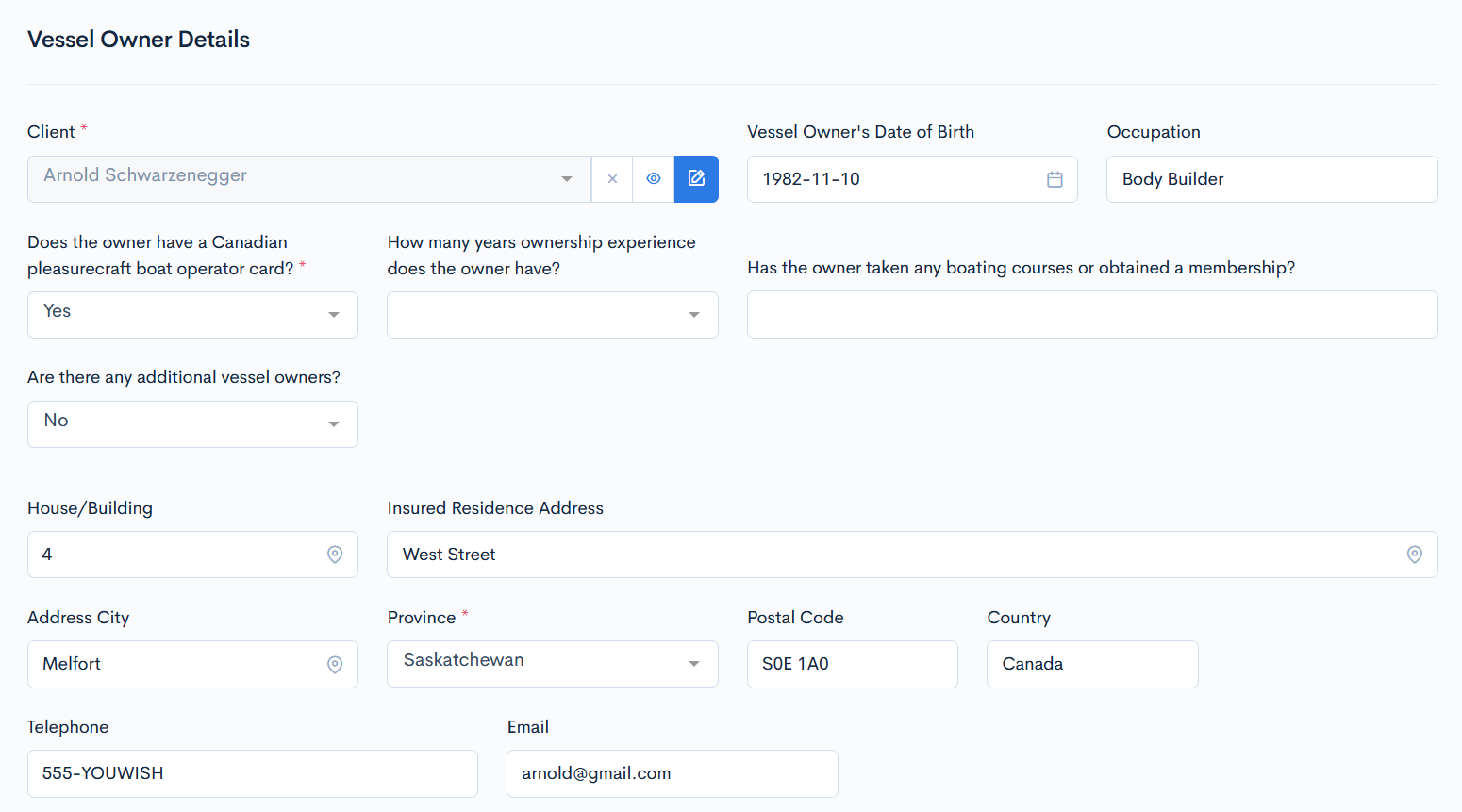
In overall, the entered values from the current quote will be duplicated to another quote, which schema has the 1d8c537e-19ed-45aa-a508-305c0eaa22bd reference number. This quote will be completely new.
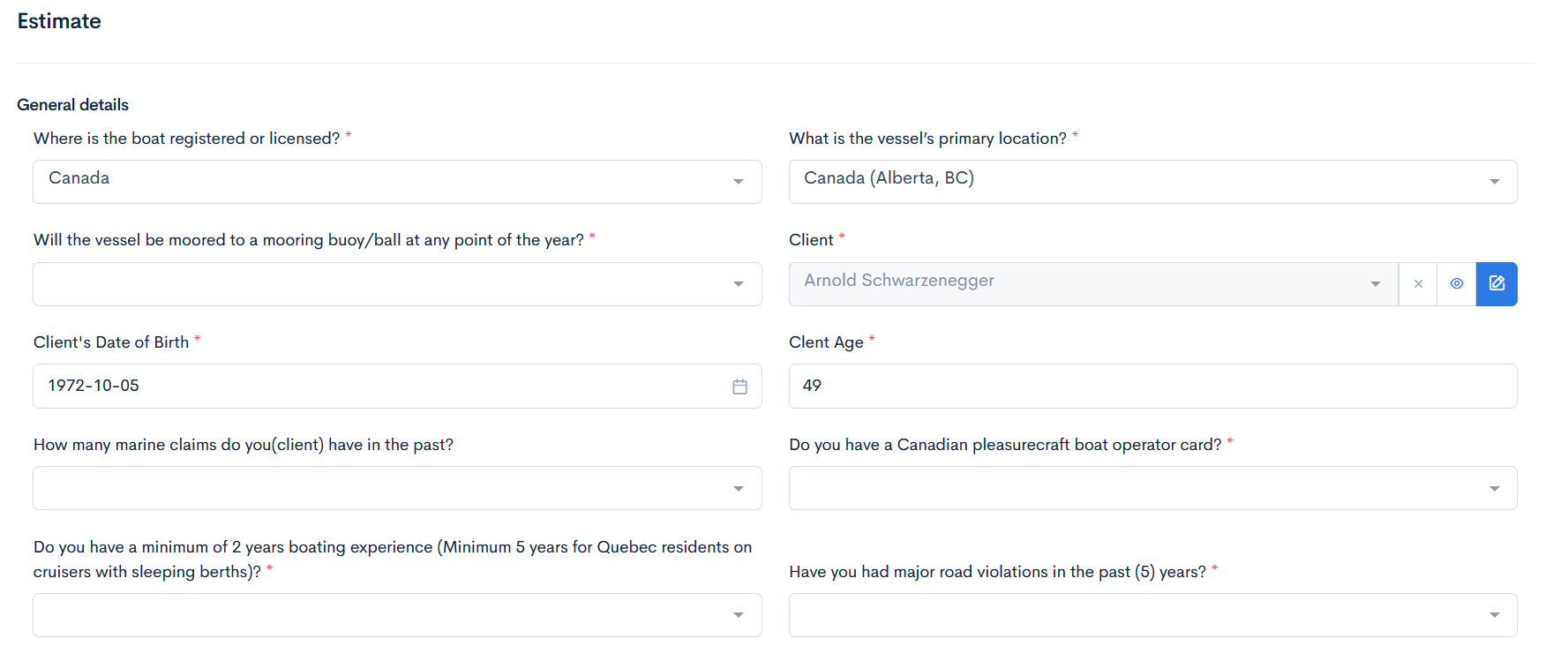
The same values are duplicated into another quote:
Internal - Generate Client Code
{info.fa-info-circle} In this example other parts of the schema are removed for more clarity.
The client reference generation takes client_id as a parameter and generates the reference to the client record. This integration does not use any buttons, it happens automatically.
In the Q&B system client code is created through the internal generator, which is accessed by the defined API. To define this API, you have to open your schema, click on the index.json and start creating an object in the apiIntegrations keyword.
Lets look at the following example:
{
  "label": "Motor fleet insurance",
  "description": "RideShur",
  "uiType": "quote",
  "version": "1.0",
  "apiIntegrations": {
    "counter": {
      "endpoint": "internal.quotes.client.code",
      "type": "internal",
      "requestFields": {
        "proposer.policyHolder": "client_id"
      },
      "responseFields": [],
      "properties": {
        "reference": "counter"
      }
    },
}
}
Here we have an API integration, which is used to generate the client code. The whole structure is defined in the counter object (you can name it your whatever you want). It consists of the following keywords:
endpoint- a connection point to the other system. For code generation it is alwaysinternal.quotes.client.code.type- for the code generation it is alwaysinternal.requestFields- enter the client field, for which the code has to be generated. In this caseclient_idwill be taken from theproposer.policyHolderfield (a name is entered into that field).
{info.fa-info-circle} For this API integration to work, in the settings, client_counter_uuid key, you have to define the client UUID.
Internal - Notify
{info.fa-info-circle} In this example other parts of the schema are removed for more clarity.
The notify functionality sends a notification via e-mail or internally to the system user if something in the quote has changed (e.g. status).
In the Q&B system client code is created through the internal generator, which is accessed by the defined API. To define this API, you have to open your schema, click on the index.json and start creating an object in the apiIntegrations keyword.
Lets look at the following example:
{
  "label": "Motor Cover",
  "uiType": "quote",
  "version": "1.0",
  "apiIntegrations": {
    "notifyUW": {
      "label": "Notify UW",
      "endpoint": "internal.quotes.notify",
      "type": "internal",
      "method": "post",
      "requestFields": {
        "quoteField.id": "quote_id"
      },
      "staticFields": {
        "email_template_tag": "referal_template",
        "level": "message",
        "users": [
          "0bee13c3-a617-49a5-af82-99cd13e2448c"
        ]
      }
    },
}
Here we have an API integration, which is used to notify someone. The whole structure is defined in the notifyUW object (you can name it your whatever you want). It consists of the following keywords:
label- type whatever you like.endpoint- a connection point to the other system. For notifications it is alwaysinternal.quotes.notify.type- for notifications it is alwaysinternal.method- for notifications it is alwayspost.requestFields- in this object enter"quoteField.id": "quote_id", this requests the quote reference number.staticFields- here you must define the message type and the recipient:email_template_tag- enter the email template tag, if you wish to send an email. The tag can be found in the email templates list. If you will not write this key, then the notification will come internally in the system.level- select betweenmessage,warning,referral,decline.users/clients/entities- enter the id, to whom notification will be sent.
Therefore, in this case a user with the 0bee13c3-a617-49a5-af82-99cd13e2448c id will receive an email notification, when the notification button is clicked in the quote.
Internal - Copy Binder Document
{info.fa-info-circle} In this example other parts of the schema are removed for more clarity.
The copy binder integration copies one or many documents from the binder to the quote documents list.
Lets look at the following example:
{
  "label": "Miscellaneous Professional Liability",
  "description": "SHORE Underwriting",
  "uiType": "quote",
  "version": "1.0",
  "apiIntegrations": {
    "copyBinderDocs": {
      "label": "Copy Policy Wording",
      "endpoint": "internal.quotes.binders.documents.copy",
      "type": "internal",
      "transformations": [
        {
          "entryKey": "submission.policyWording",
          "options": "binderDocuments",
          "optionValue": "tag",
          "requestField": "tag"
        }
      ]
    },
}
Here we have an API integration, which is used to to copy binder documents. The whole structure is defined in the copyBinderDocs object (you can name it your whatever you want). It consists of the following keywords:
label- type whatever you like.endpoint- a connection point to the other system. For copy documents it is alwaysinternal.quotes.binders.documents.copy.type- for quote duplicating it is alwaysinternal.transformations- this keyword takes a value from the defined dataset and maps it to the quote documents tab:entryKey- defines the path to the quote selectable field. In this case the binder documents will be taken from thepolicyWordingfield, which has already defined the dataset.options- from which dataset the documents will be downloaded.optionValue- entertag, so that all the documents from the dataset (binderDocuments), which is assigned to the selectable field, will be downloaded.requestField- entertag, so that all the documents would be uploaded to the quote Documents folder.
You can also enter one particular tag, but in this case the transformations object is not required anymore, you will need the staticFields object:
{
"label": "Miscellaneous Professional Liability",
  "description": "SHORE Underwriting",
  "uiType": "quote",
  "version": "1.0",
  "apiIntegrations": {
    "copyBinderDocs": {
      "label": "Copy Policy Wording",
      "endpoint": "internal.quotes.binders.documents.copy",
      "type": "internal",
      "staticFields": [
        {
          "tag": "B1",
        }
      ]
    },
}
Button
To call the API integration, you need a button. Here in the properties object, which is outside of apiIntegrations, an object followPolicyButton(you can name it your whatever you want) is created. There you have to define the uiType and uiOptions for buttons, and to attach the API integration, the default key value should be the integration name, in this case it is followPolicy.
  "properties": {
    "followPolicyButton": {
      "label": "Follow Policy (pdf)",
      "type": "string",
      "default": "followPolicy",
      "uiType": "integrationButton",
      "uiOptions": {
        "icon": "fe fe-file",
        "class": "btn-outline-secondary",
        "status": {
          "only": [
            "issued"
          ]
        }
      }
    }
  }
The button will appear in the quote, and the API integration will be performed when clicked. The generated document can be found in the document section of a quote.
API Logs
The API integrations are not always successful. For example, you tried to create an invoice and got the following error:
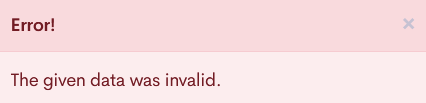
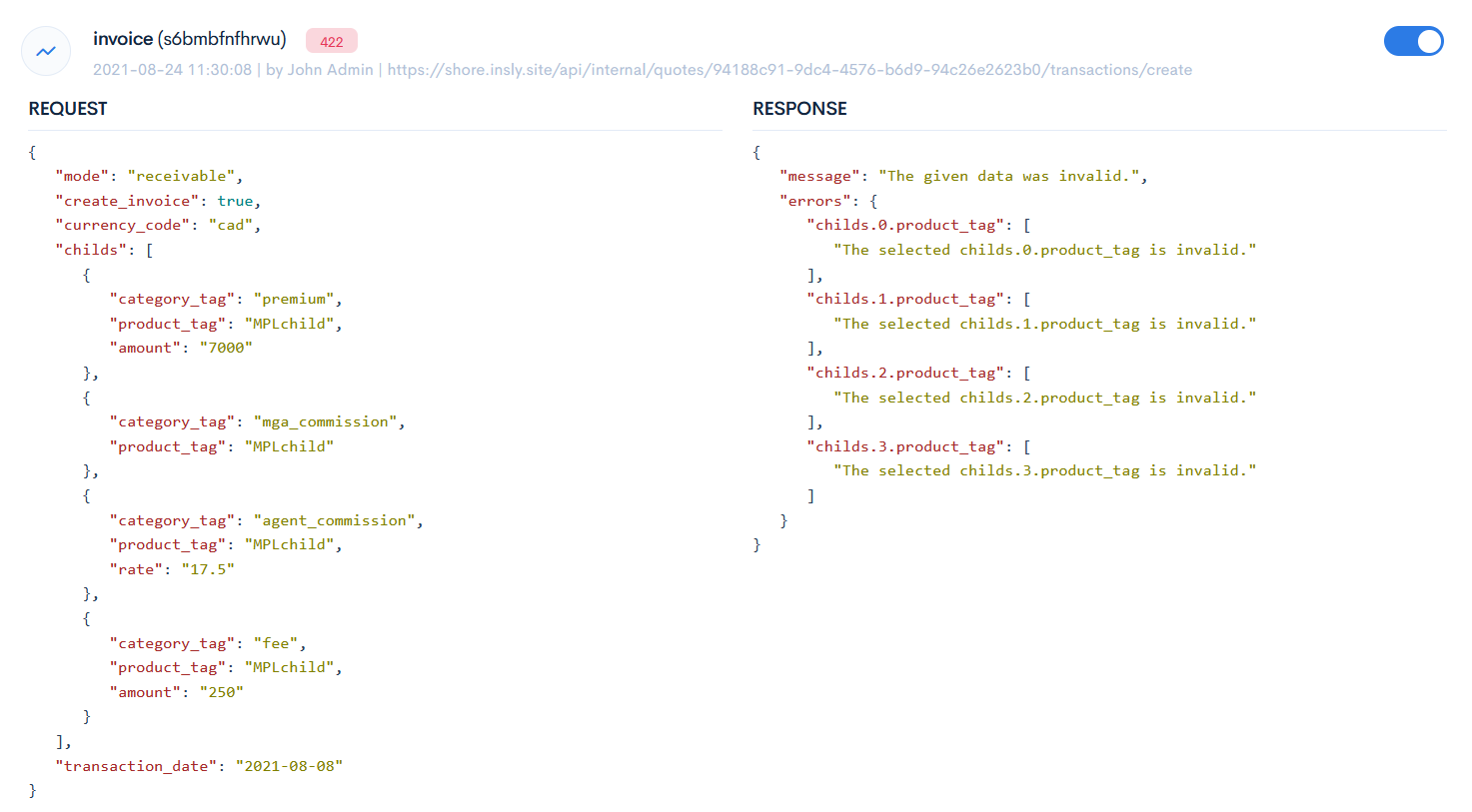
To see what exactly has happened, go to the API Logs tab. The API integration with an error will be marked red. Toggle the button to open the request and response structures. In this case we see, that all the product tags were written incorrectly.
The successful integrations can also be checked, they are marked green.
Keywords
| apiIntegration | Description | Example |
label |
Name of the API integration endpoint. Type: string Default value: (empty) |
|
type |
Format of the API call. Possible values:
Type: string Default value: api |
|
endpoint |
A connection point to another system, where the API request is sent. Type: string Default value: (empty) |
|
method |
A HTTP call method. Type: string Default value: post |
|
url |
An URL to the external system endpoint. Type: string Default value: (empty) |
|
token |
A security token to grant access to the API endpoint. Type: string Default value: (empty) |
|
templateTag |
Tag, that is assigned to the particular document template, which will be used when generating a document. Used only in the carbone type.Type: string Default value: (empty) |
|
requestFields |
Path name to the requested fields in the following structure: fileName.fieldName. Values are exactly the same strings as the strings in the document template, where the information should be mapped. Type: string Default value: (empty) |
|
staticFields |
Various fields, that are not requested from the quote, but from transaction categories, currencies, etc. Values are exactly the same strings as the strings in the document template, where the information should be mapped. Not used when creating various type of invoices. Type: string Default value: (empty) |
|
responseFields |
A name of the expected response key field. If the array is empty, then you will receive the whole response. If you do not require this, then you should specify the fields to be received. Type: string Default value: (empty) |
|
policyFields |
Requested fields from policies. Type: string Default value: (empty) |
|
objects |
Requested fields from the objects section in a quote in the following structure: objects.columnName. Values are exactly the same strings as the strings in the document template, where the information should be mapped. The {0} sign means that absolutely all objects will be mapped. Type: object Default value: null |
|
transformations |
Transformations are used to take out a particular value from the requested drop-down field. As the simple entryKey request gets only the UUID, you have to define more specific path through the options and optionValue keys. The following keys are used for mapping:
Default value: (empty) |
|
endorsements |
Maps the required endorsements fields to the document output fields. Used only in the carbone type. The following default fields are used to describe the mapping:
sendCurrentVersion- this option allows to send only the current version of the endorsement list.The {0} sign means that absolutely all endorsements in the library will be mapped.Type: object Default value: null |
|
properties |
A group of any properties. Type: string Default value: (empty) |
|