Calculation Example
In this chapter we are going to analyse one example on how the Rating Engine works together with the Q&B system. This will be done with a simple yet informative calculator called Church Choice. Firstly, we are going to look at the setup on the Rating Engine side, and next on the Q&B side.
Rating Engine Side
At first, we recommend you to determine what formulas need to be used and what values will be taken from the quote and transferred to the variables in calculator.
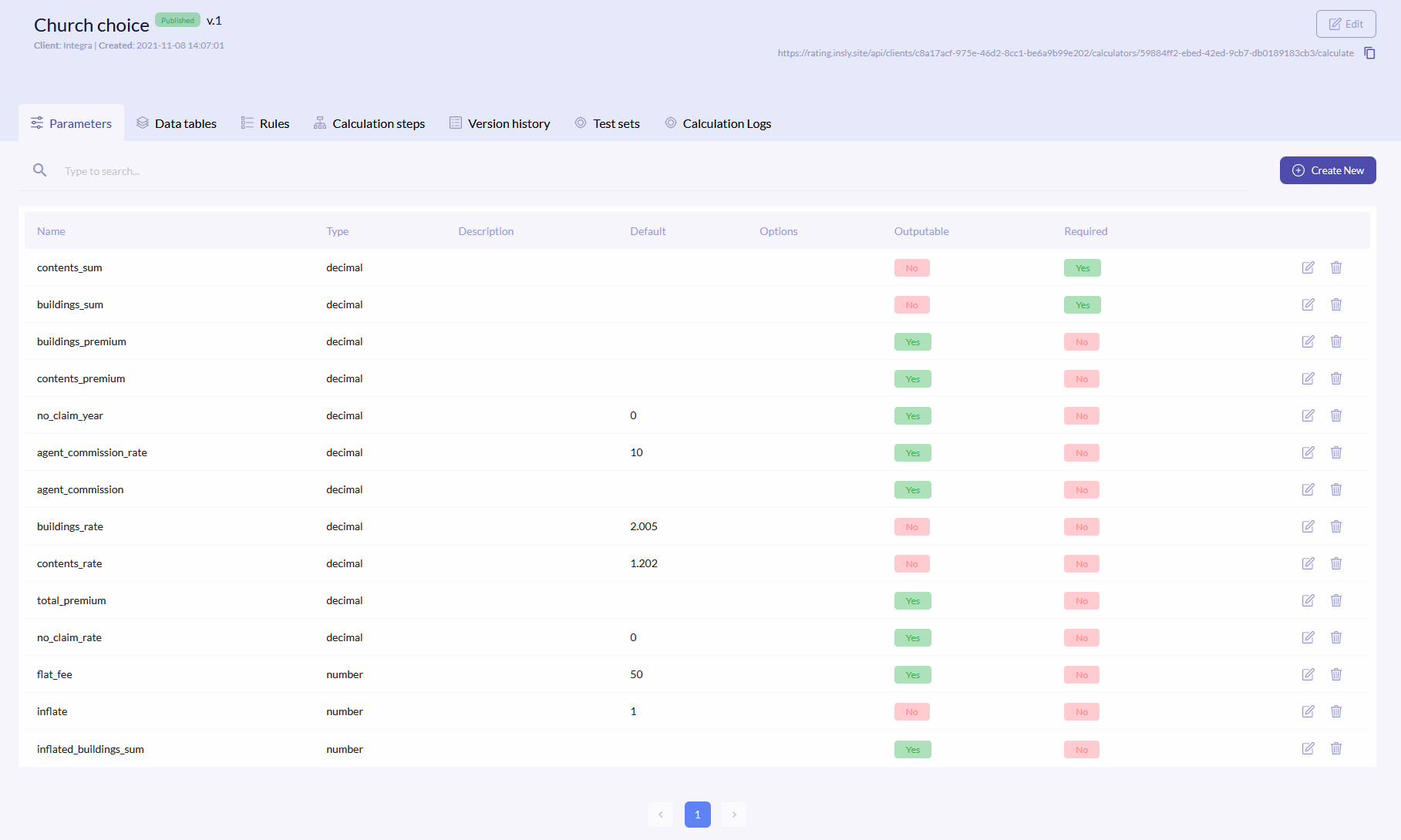
Once you decided the formulas which approximately will be, it is time to create variables. The parameters are defined in the Parameters tab. Some of them will be used in formulas (will take a value from Q&B, like buildings_sum) and others will be used as the calculatable value and outputed back into the Q&B system (like buildings_premium). If the value is marked as not outputable, it will be used in the calculation, but will not be seen in the calculation log. Default values will be passed if nothing is received from Q&B. Lets define the following parameters:
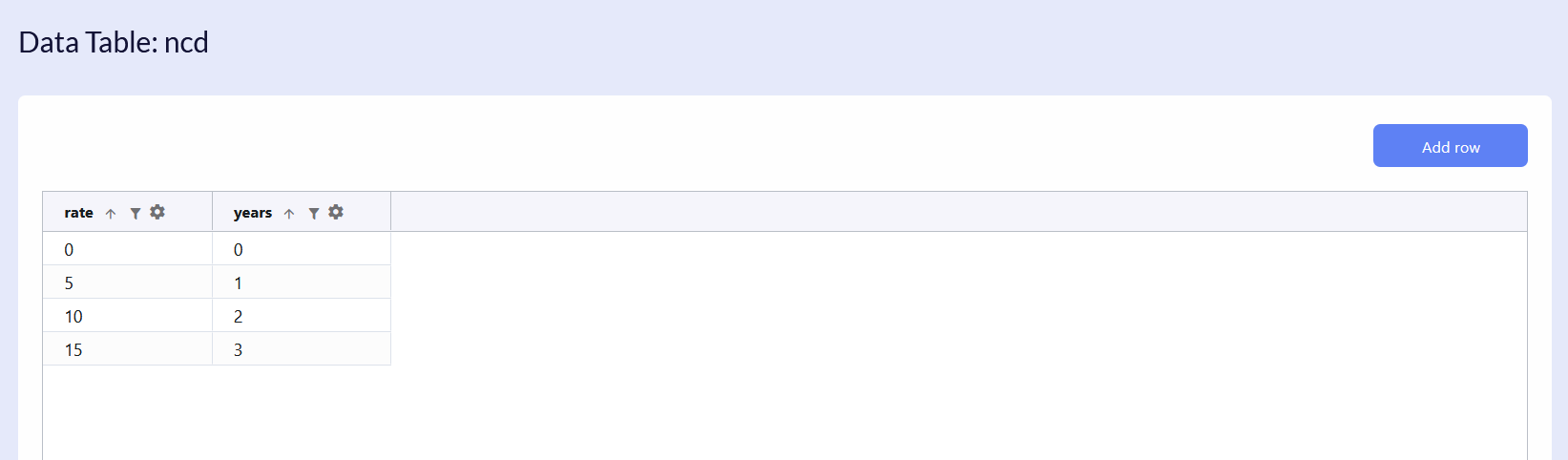
Next, the no_claim_rate parameter will be looked up from the table, so one is needed and it is called ncd. Here the system will look up the rate by the given year from the Q&B system.
The following step is to write down all the formulas, that will calculate outputs. In the Calculation Steps tab, create new formula and on the left side select the calculatable parameter, and on the right side field write down the formula.
For example, to calculate the buildings_premium parameter, you need to pass the value from Q&B to buildings_sum and multiply it with buildings_rate, which already has a default value of 2.005.

To calculate the agent_commission parameter, firstly you need to know total_premium. This is why formula for this parameter calculation is put higher than formula for agent_commission. If total_premium would be lower in rank, then you would receive an error for agent_commission calculation, as the calculator would have an unknown variable.

The no_claim_rate parameter is looked up in the data table. Firstly, the system receives value for no_claim_year and checks the value in the ncd table, years column. Value from the same row, rate column will be no_claim_rate.

In the end, lets add a rule. When creating new calculation step, select Rule, and we will write that if a person does not mark the Terrorism field as yes, the Note8 rule will appear.

Q&B Side
{info.fa-info-circle} In this example other parts of the schema are removed for more clarity.
For the Rating Engine calculator to work, you have to make an API integration in the Q&B system. To define this API, you have to open your schema, click on the index.json and start creating an object in the apiIntegrations keyword.
Lets look at the following example:
{
  "label": "Church Choice",
  "uiType": "quote",
  "version": "1.0",
  "apiIntegrations": {
    "ratingEngine": {
      "label": "Rating",
      "url": "https://rating.insly.site/api/clients/c8a17acf-975e-46d2-8cc1-be6a9b99e202/calculators/59884ff2-ebed-42ed-9cb7-db0189183cb3/calculate",
      "token": "Bearer 531923aa-abd6-4615-8cf0-6353c3f1b559|mjERlxKeCDwHcmz63Ak1NyhWK7AdKEuJN45sXLIO",
      "requestFields": {
        "propertyDamage.totalPropertySumInsured": "buildings_sum",
        "propertyDamage.totalContentsValue": "contents_sum",
        "premium.noClaimsYear": "no_claim_year",
        "premium.inflate": "inflate",
        "submission.brokerCommission": "agent_commission_rate",
        "actofterrorism.isActOfTerrorismApplied": "terrorism"
      },
      "responseFields": {
        "premium.buildingPremium": "output.buildings_premium",
        "premium.contentPremium": "output.contents_premium",
        "premium.agentCommission": "output.agent_commission",
        "premium.flatFee": "output.flat_fee",
        "rules": "rules"
      },
      "overridableFields": [
        "rules"
      ]
    },
}
}
Here we have an API integration, which is used to generate a policy document. The whole structure is defined in the ratingEngine object (you can name it your whatever you want). It consists of the following keywords:
label- type whatever you likeurl- copy and paste the calculator url. Click here to know where the url can be found.token-
{
  "label": "Church Choice",
  "uiType": "quote",
  "version": "1.0",
  "apiIntegrations": {
    "ratingEngine": {
      "label": "Rating",
      "url": "https://rating.insly.site/api/clients/c8a17acf-975e-46d2-8cc1-be6a9b99e202/calculators/59884ff2-ebed-42ed-9cb7-db0189183cb3/calculate",
      "token": "Bearer 531923aa-abd6-4615-8cf0-6353c3f1b559|mjERlxKeCDwHcmz63Ak1NyhWK7AdKEuJN45sXLIO",
    }
  }
}
RequestFields
The next object is requestFields, where you map all the required quote fields to the predefined Rating Engine parameters:
{
    "requestFields": {
        "propertyDamage.totalPropertySumInsured": "buildings_sum",
        "propertyDamage.totalContentsValue": "contents_sum",
        "premium.noClaimsYear": "no_claim_year",
        "premium.inflate": "inflate",
        "submission.brokerCommission": "agent_commission_rate",
        "actofterrorism.isActOfTerrorismApplied": "terrorism"
      },
}
The key is a path to the quote field, and a value is parameter name in the Rating Engine. For example, the first two rows are taken from different JSON files: propertyDamage.json, premium.json and refer to the elements totalPropertySumInsured and noClaimsYear. The values themselves will be mapped to the Rating Engine parameters buildings_sum and no_claim_year.
Also, here we map quote fields, that could trigger a rule:
{
    "propertyDamage.totalPropertySumInsured": "buildings_sum",
    "premium.noClaimsYear": "no_claim_year",
    "actofterrorism.isActOfTerrorismApplied": "terrorism"
}
ResponseFields
In the responseFields object you map the Rating Engine calculated parameters to the quote fields:
{
    "responseFields": {
        "premium.buildingPremium": "output.buildings_premium",
        "premium.contentPremium": "output.contents_premium",
        "premium.agentCommission": "output.agent_commission",
        "premium.flatFee": "output.flat_fee"
      }
}
The key is a path to the quote field, and a value is parameter name in the Rating Engine. For example, this row is taken from the premium.json file and refers to the element buildingPremium. The Rating Engine will calculate the buildings_premium parameter and pass the value to the Building Premium field.
The key value in this case must be written in the following structure: output.your_parameter.
Mapping Rules
To transfer rules to the Q&B system, in the very end of the responseFields object, write the following line:
"rules": "rules"
Also, the overridableFields fields object must be included:
{
    "responseFields": {
        "premium.buildingPremium": "output.buildings_premium",
        "premium.contentPremium": "output.contents_premium",
        "premium.agentCommission": "output.agent_commission",
        "premium.flatFee": "output.flat_fee",
        "rules": "rules"
      },
      "overridableFields": [
        "rules"
      ]
    },
}